guruTricks: Android

Technology

  • News
  • Tips
  • Tricks
  • Tutorials

Hot

Showing posts with label Android. Show all posts

Thursday, November 16, 2017

How to Migrate All Your Data From Chrome to Firefox

November 16, 2017 0


If you’re thinking about switching to Firefox Quantum—or at least trying to switch—Firefox makes it pretty easy. Firefox can import your bookmarks, saved passwords, browser history, and cookies directly from Google Chrome.
It can also import this data from Microsoft Edge or Internet Explorer, if you use those instead.

Migrate Your Bookmarks, Passwords, History, and Cookies

Firefox normally prompts you to import data the first time you install it. However, if you had Firefox installed previously and now want to import data, you’ll need to launch the tool manually. The Import Browser Data tool is a little hidden—it’s under the Bookmarks Manager window.
To access the Bookmarks Manager, either click the Library icon on the toolbar and click Bookmarks > Show All Bookmarks, or press Ctrl+Shift+B.


Click the “Import and Backup” button on the toolbar and select “Import Data From Another Browser”. (If you just want to import bookmarks you’ve exported from Chrome or another browser as an HTML file, you can also just click “Import Bookmarks from HTML” here and then select the HTML file.)


Select “Chrome” in the Import Wizard and click “Next” to import data from Google Chrome. Ensure all Google Chrome browser windows are closed before you continue with the process.


You’ll be prompted to choose which data you want to import. If you’ve set up multiple Chrome browser profiles, you’ll first be asked which profile you want to import data from.
By default, Firefox will import Chrome’s Cookies, Browsing History, Saved Passwords, and Bookmarks. You can uncheck any of these options to only import some types of data.


Firefox will import the data and say it was imported successfully. Chrome’s bookmarks will be placed in “From Chrome” folders in your bookmarks menu and toolbar, but you can reorganize them however you like.

Download Your Add-ons

Firefox can’t import other data you may consider crucial, like your add-ons. You’ll have to hunt down equivalent extensions in the Firefox Add-ons gallery yourself.
If you use a popular add-on from a big company, there’s a good chance there’s a version of the extension for Chrome made by the same developer. Smaller, independent extensions may not be available for both browsers, but you’ll probably find an add-on that can do something similar.

Sync Your Firefox Browser Data Between Computers

Firefox has its own browser sync feature that can keep your data in sync across multiple PCs, phones, and tablets. You can check your Firefox Sync settings by clicking menu > Options > Firefox Account. If you haven’t yet signed in with a Firefox account, you can create one from here to start syncing your data.
Sign in with the same Firefox account on all your devices and your data will be synced between them, just like with Chrome. Firefox syncs open tabs, history, bookmarks, logins, add-ons, and preferences. So, once you set up Firefox once, it will sync your preferences to all your other PCs.


You can get this same data on your phone or tablet, too. Firefox offers apps for Apple’s iPhone and iPad as well as Google’s Android. They provide a way to access your Firefox bookmarks, open tabs, saved passwords, and history on your mobile devices, too.
Thankfully, with Firefox Quantum, Firefox now uses Google as the default search engine once again. Yahoo! is no longer the default, so you don’t have to worry about changing that.

{source}

Read More

Wednesday, November 15, 2017

WhatsApp’s deleted messages can still be read; here’s how

November 15, 2017 0


WhatsApp allows you to recall or delete a sent message. However, this trick will show you the message even after it has been deleted.

whatsapp-stock
WhatsApp‘s most popular features in recent times is the message recall or ‘Delete for Everyone’ option that allows you to recall a particular message which has been inadvertently sent. Recently, we discovered that there is no time limit to recalling a sent message. Now, it has been found that the ‘delete for everyone’ feature can be easily surpassed. Here’s how you can still view a deleted message without rooting the device, or tampering with the app.
Currently, if you are on the latest version of WhatsApp for Android or iOS, you can delete or recall a message by tapping on the message and choosing the delete option. From here, you can decided to whether delete it for yourself or for everyone. When launched, it was reported that a user could recall or delete a message within 7 minutes of the message being sent. However, in our own tests, we found the limit can be easily surpassed.
When deleted, ‘This message was deleted’ message shows in the chat instead of the particular message. Now, this can be unnerving for some curious minds who want to know what exactly was the message which was deleted. It could even be for law purposes. For this, an app called ‘Notification History’ can help solve the mystery of a deleted message. We tested the process on an Android device and this is how it works.
Whatsapp-deleted-message
Ensure you are running the latest version of WhatsApp on your device. Install ‘Notification History’ app from the Play Store and allow the required permissions to be able to read the deleted message. When you receive a message on WhatsApp, the Notification History app will show you a log of all the notification, along with the message. Interestingly, this app does not show a preview but the entire message. So there’s no scope of missing out on the details. If you tap on the log, you will be able to see the message. However, there is a limitation of characters. In our tests, a fairly long message, above 100 characters, was visible. This is in contrast to your device’s own notification settings where only a small portion of the text is shown.
Now, if the message is deleted from the sender’s end, the Notification History app will show you that notification as well, without deleting the previous message. So essentially, you get to know the exact time and content of the message, along with when it was deleted, all in sequential order, without you having to scramble through WhatsApp. 
It is worth mentioning that this workaround, which was first reported on Spanish website, androidjefe, is possible only on an Android device because, on this platform, WhatsApp only changes the alert’s content whereas, on iOS, it deletes the entire notification.
In addition to this app, you can also access the notification log by long-pressing the home screen, and then tapping on Widgets > Activities > Settings > Notification log. From here you can access the system’s notification log. On stock Android, the Settings widget can give access to the notification log.
{BGR}
Read More

Android 8.1 Oreo gets new space-saving feature

November 15, 2017 0


Google is expected to release Android 8.1 Oreo sometime in December.

android-oreo-cookie
Google released the developer version of Android Oreo 8.1 last month. With few weeks in beta, some hidden features are being discovered by developers. The latest discovery reveals a feature, which could help save space on your Android smartphones. Storage has been one major problem on smartphones especially with apps hogging space running in the background. Not only does this take up space, it also makes the smartphone slow or freeze while using it.
First reported by XDA Developers, a post on Android Open Source Project explains this space-saving feature that essentially works by downgrading inactive apps. According to the post, this feature will work when the smartphone is running low on space. Here, active apps are distinguished as those which were active in foreground and background, and also on other packages. As for inactive apps, the number of days till which it will be considered inactive will be determined by a system operator (sysop).
If these inactive apps are used again, then the system will run the same procedure again. Only those apps which are inactive will be targeted with this feature. It would take time before this feature lands up on devices as Android 8.0 Oreo is only starting to run on smartphones. As with most OS features, OEMs will have to manually enable this feature for their smartphones. Google is expected to release the stable version of Android 8.1 Oreo sometime in December.
Recently, it was discovered that Google is testing an SMS feature for Chromebooks and Pixel 2 smartphones. This allows Pixel 2 users to read and reply to SMSs on their Chromebook. However, it isn’t known if Google will release this feature with the stable build. Android 8.1 Oreo update also enables the Pixel Visual co-processor on the Pixel 2 and Pixel 2 XL. More features discovered include managing wallpaper colors, better performance for low-RAM devices when running Android apps, among others.

Read More

Saturday, October 28, 2017

Is this the first Microsoft-branded Android phone?

October 28, 2017 0

Yes, Microsoft is planning to sell its own Android phone in its stores for the very first time. The Redmond giant recently unveiled the Samsung Galaxy S8 Microsoft Edition, the news came as a shock to many people, it also started a bunch of speculation about Microsoft-branded Android Phone.
Windows never had a solid foothold on mobile and Microsoft ultimately announced that it will no longer develop Windows Phone features and hardware. Satya Nadella’s vision is to empower every user regardless of the operating system and thus this year, Microsoft unveiled new apps for Android and iOS devices, including the Edge web browser.
From Microsoft Edge to Office apps, today the Play Store has all the apps you will find on the Windows Store. There is only one thing missing: Microsoft-branded Android phone and it appears to be coming sooner than speculated.
Yesterday, the Redmond giant announced tools for Microsoft Teams awareness program. In the blog post, Microsoft has shared an image ‘Bringing you a chat-based workspace’ where the company has included images of Surface devices and an Android phone. The phone has Microsoft logo and it runs Android operating system.
It might be possible that the image has been created only to promote the Microsoft Teams app for Android. What do you think? Is Microsoft really working on an Android phone? Let us know your thoughts in the comments below.
Read More

Friday, October 27, 2017

Instagram introduces Superzoom feature: Here’s how to use it

October 27, 2017 0

Instagram gets more creative with its new feature and filter. Check it out.

indtagram-superzoom-feature
Instagram has recently introduced quite a few nifty features that bring the creativity in you. One such feature was Boomerang, and now it has introduced another feature that could be just as fun. Instagram’s new feature dubbed Superzoom will automatically zoom your smartphone’s camera for an up and close photo or video. The feature has started rolling out for Android and iOS users. The feature gets activated with just a single tap in Stories.
The new feature also creates dramatic sound effects, along with zooming-in your photo. It will make it a cinch to record quick reaction videos or to add a dramatic flair to just about anything you think of. To use the new Superzoom feature, all you need to do is start a new story, swipe to the ‘Superzoom’ option, hold to record, add desired filters and effects, and you’re done. The feature allows users to send the final product via Instagram Direct, share as a story, or even push it out as a normal post.
Besides this new feature, with Halloween around the corner, Instagram has added five new Halloween-related face filters and Halloween stickers. These will be available through November 1. You can choose between looking like a zombie or a vampire or a ghost. The sticker options include pumpkins, candy corn, and other spooky things. 
Instagram, in its blog post said, “Whether you’re planning spooky activities with friends or just hanging out at home, get into the Halloween spirit by turning yourself into a zombie, transforming from a vampire into a flying bat or getting lost in a mysterious fog. You can also add Halloween stickers to your photos and videos as a final touch.”
Instagram-Face-Filters-Halloween-2017instagram-Halloween-stickers
As of September, Instagram had reached 800 million monthly active users, up from 600 million in December 2016. Instagram also said it has 500 million daily active users. The photo-sharing site recently introduced ’Polling stickers’, which allows you to ask a question, and provide two answers that users can choose from. The default responses are “yes” and “no,” but you can also ask users to choose between two different options.
{BGR}
Read More

Friday, October 20, 2017

WhatsApp Live Location sharing rolls out in India for iOS, Android apps

October 20, 2017 0

You can choose the duration of sharing your location on WhatsApp.

whatsapp-stock
WhatsApp has been introducing a host of new features on its app this past year. WhatsApp’s latest feature now allows users to share their location in real-time with their contacts. Live Location on WhatsApp has been rolled out to both iOS and Android users.
The Live Location feature has been rumored for quite a few months now. It was even spotted on the beta versions of WhatsApp hinting on its imminent launch. To use this feature, simply tap on the attach button located next to the text bar on your chats. Under “Location” there will be a new option to ‘Share Live Location’. Selecting this will allow your friends and family to track you real-time on a map. You can choose to set the duration for how long your location can be tracked on the map.
WhatsApp Live Location
Live Location is enabled for both single and group chats. In a group chat, more than one person can send their location at the same time. All the Live Locations sent on one group will be visible on a single map instead of independent ones. As seen in the screenshots, you can set time duration of 15 minutes, 1 hour and 8 hours for letting others view your Live Location. 
Once your Live Location is sent you can simply tap on “Stop Sharing”, which will be available just below your map card. The same will be available in a group chat where you can stop sharing by tapping on the Live Location map. Below the map you will see your profile, and you can tap on it to stop sharing your real-time location. 
WhatsApp already allows you to share static location with your contacts. With Live Location, users can benefit from being able to let their friends and family know where they are in terms of safety. Although there are risks involved, WhatsApp gives complete user control over this feature. WhatsApp also says that Live Location is protected with end-to-end encryption, as is the case with content and texts sent over the messaging app.
Read More

Friday, October 13, 2017

How to Convert a PDF File Into an Editable Text Document Using Google Drive

October 13, 2017 0
Adobe’s PDF standard is handy whenever you need to distribute some information and be sure that it’s seen the same way by all recipients. But PDF files are also infamously tough to edit.
Unless you’ve paid for Adobe Acrobat (the full version, not just the Reader), you’ll have to look for a specific tool to edit the text of PDFs. Many of these are available on various platforms, but for an easy and free method that works across all kinds of desktops and mobile devices, you can use Google Docs.
If you have your PDF file ready, open drive.google.com in any browser and log in with your Google account. It’s possible to go through this process on mobile with a phone browser, so long as you do it in “desktop view,” but it’s going to be somewhat difficult—get to a full laptop or desktop PC if you can.
Upload your PDF file from your local files by clicking the blue “NEW” button on the left, then “File upload.” Select your PDF and wait for it to upload to Google’s server.
Once the file is in your drive, right-click or long-tap the item in Drive’s main view. Select “Open Open with,” then click “Google Docs.” The PDF document will open in a new browser tab in the Google Docs interface.
From here you can edit any of the text in the PDF document as if it were a standard word processor file. some of the formatting may be a bit off thanks to Docs’ interpretation of the images and spacing in the PDF file, but all of the formatted text should be visible and editable—if it’s a larger file, Docs will even create an automatic outline separated into pages.
You can edit any of the text in this window and save your work online in Google Docs for later. If you’d rather have a standard document file for an offline word processor, click “File,” then “Download as.” Here you can choose from Docx, ODT, TXT, RTF, and other formats, so you can open them in Microsoft Office (or your word processor of choice).
Click on the one you want, and it will immediately be downloaded to your default desktop or phone folder. That’s it! You now have a saved, editable copy of your original PDF, compatible with any word processor.
Read More

5 smartphones you can buy this Diwali at under Rs 40,000

October 13, 2017 0

If you are looking for a premium smartphone at up to Rs 40,000, here are our top picks.

xiaomi mi mix 2 ceramic white
The festive season has kicked in already and if you are looking at splurging a bit on your gadgets, now is the time. Major e-retailers as well as offline stores are offering impressive discounts and schemes on the purchase of smartphones. If you have a budget of up to Rs 40,000, here are our top five picks for you.

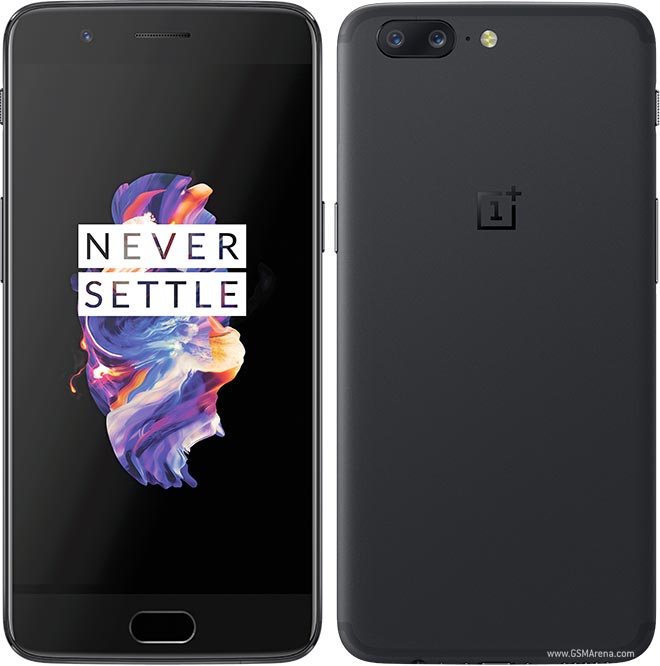
OnePlus 5

Clearly one of the leading smartphones in the premium category, the OnePlus 5is priced from Rs 32,999. It features a 5.5-inch full-HD AMOLED display and is equipped with the Qualcomm Snapdragon 835 SoC and 6GB/8GB of RAM. You further get a pair of 16-megapixel+20-megapixel cameras at the back, with a 16-megapixel camera up front for selfies and video calling. The OnePlus 5 is fueled by a 3,300mAh battery, and in a recent test, its fast charging capacity surpassedthat of the Apple iPhone 8 Plus. 

Nokia 8

Nokia-8---BGR-watermarked-05
The latest flagship smartphone from HMD Global’s portfolio, Nokia 8 brings similar features as the OnePlus 5, albeit with a special ‘Bothie’ mode. The mode uses cameras on the front and back to allow you simultaneous video recording, live, or still capture. It is priced at Rs 36,999, and features a 5.3-inch QHD display, the Qualcomm Snapdragon 835 octa-core SoC, 4GB of RAM and 64GB of internal storage. The Nokia 8 also comes with a dual-camera setup with a pair of 13-megapixel sensors. 

Apple iPhone 6S

Although an old member from Apple’s stable, the iPhone 6S will fit the bill just right if you are mulling a switch to the iOS ecosystem. It is one of the first smartphones from Apple to feature 3D Touch. There’s a 4.7-inch  LED-backlit HD display and A9 processor running under the hood. If you buy the base model with 16GB of internal storage, then it will cost you Rs 39,985, but if you really want to splurge and have more storage then you will have to shell about Rs 4,900 more for the 32GB model. 

Samsung Galaxy S7

samsung-galaxy-s7-getty
Another oldie, but still going strong. BGR India awarded the Samsung Galaxy S7as the best flagship smartphone of 2016 and its mention in our list today undoubtedly means it is still a great value for money phone to buy. Available at Rs 39,400, Samsung is offering a one-time screen replacement scheme on the smartphone. As for specifications, the Galaxy S7 features a 5.1-inch quad-HD display and is equipped with Exynos 8890 64-bit SoC with 4GB of RAM. For optics, there’s a 12-megapixel rear camera with f/1.7 aperture and up front, there is a 5-megapixel camera. 

Xiaomi Mi Mix 2

xiaomi mi mix 2 main 3
The newest kid on the block, Xiaomi Mi MIX 2 adds to the crowding segment of bezel-less phones. It is the company’s first bezel-less phone to debut in India, and if you want to upgrade to a fancy-looking smartphone then the Mi MIX 2 might be a good choice. It features a 5.99-inch full HD+ display with an 18:9 aspect ratio. Under the hood, it runs the same SoC as the OnePlus 5 and Nokia 8, with 6GB of RAM and 128GB of default storage. However, you don’t get a dual-camera module on the phone. It is equipped with a single 12-megapixel Sony IMX386 sensor at the back and up front, there’s a 5-megapixel camera. The phone will cost you Rs 35,999 and it will be available starting October 17.  
{BGR}
Read More

Wednesday, October 11, 2017

Top smartphones to buy this Diwali under Rs 30,000

October 11, 2017 0

Here's a list of seven smartphones under Rs 30,000 that you can choose to purchase this Diwali.

Diwali is just around the corner and you’re probably still stuck with a pending gift list. For gadget lovers, there are a lot of products to choose from. To ease things for you, we’ve been collating best smartphones under the sub-Rs 10,000sub-Rs 15,000 and sub-Rs 20,000 categories. Raising the price tag higher, today we’ve gathered the best smartphones you can choose to purchase or gift under the sub-Rs 30,000 category.

Honor 8 Pro


The Honor 8 Pro sits at the border of this category with a price tag of Rs 29,999 and offers a premium experience. The highlight of the Honor 8 Pro is its dual-camera setup at the rear which includes a pair of 12-megapixel sensors of f/2.2 aperture, dual-tone LED flash, autofocus, and 4K video recording capabilities. The smartphone is powered by in-house Kirin 960 SoC paired with 6GB of RAM. 

OnePlus 3T

Just second to the flagship OnePlus 5 is the OnePlus 3T which is priced at Rs 29,999. The smartphone is a tested performer with specifications like Snapdragon 821 SoC, 6GB of RAM, 16-megapixel rear and front cameras. The OnePlus 3T is fueled by a 3,400mAh battery, and features a 5.5-inch full HD AMOLED display with a 2.5D curved glass and Gorilla Glass 4 on top. 

Oppo F3 Plus

Oppo is known for its selfie-centric smartphones and the company’s most expensive of the lot makes it in this category. The Oppo F3 Plus features a combination of 16-megapixel and 8-megapixel front cameras. Of the two, the 16-megapixel is a wide-angle sensor allowing for group selfies. The smartphone also houses a 16-megapixel rear camera of f/1.7 aperture. Rest of its specifications include a 6-inch full HD display, 4GB of RAM, 4,000mAh battery with Oppo’s VOOC fast charging support. 

Moto Z2 Play

Successor to the Moto Z Play, the Moto Z2 Play also comes with modular functionality. Priced at Rs 27,999, the Moto Z2 Play features a 5.5-inch full HD AMOLED display, 4GB of RAM and 64GB of internal storage. It is powered by Snapdragon 626 SoC, and armed with a 3,000mAh battery along with Turbo Power fast charging support. On the software front, the smartphone runs near-stock Android 7.1.1 Nougat. 

Asus Zenfone 4 Selfie Pro

Another selfie smartphone is the recently launched Asus Zenfone 4 Selfie Prowhich is available at Rs 23,999. Like the Oppo F3 Plus, the Zenfone 4 Selfie Pro also sports a dual-camera setup at the front which is a combination of 24-megapixel DuoPixel lens of aperture f/1.8 and a 5-megapixel wide-angle lens of aperture f/2.2.
You can choose to take standard and wide-angle photos by turning on the 24-megapixel resolution. The default resolution is 12-megapixels which allows you to take photos with DSLR-like blur effects. More details on the Zenfone 4 Selfie Pro include Android 7.1.1 Nougat with ZenUI, Snapdragon 625 SoC, 4GB of RAM, and a 3,000mAh battery. 

Samsung Galaxy A7 (2017)

samsung-galaxy-a7-2017-launch
The 2017 iteration of the Galaxy A7 series, the smartphone is currently priced at Rs 25,900. With a 5.7-inch Super AMOLED display, the Galaxy A7 (2017) offers 3GB RAM, 32GB storage, a 1.9GHz octa-core SoC, 3,600mAh battery. You can also avail Samsung’s ‘Never Mind’ offer of one-time screen replacement at Rs 990 with the purchase of the Galaxy A7 (2017). 
Apple iPhone 6
The Apple iPhone 6 also makes for a worthwhile purchase in this category. The Apple iPhone 6 32GB is priced at Rs 29,500 but you can get it at discounted prices on e-commerce websites. In terms of specifications, the iPhone 6 features a 4.7-inch Retina HD display, and is powered by the A8 dual-core chipset. It comes with 1GB of RAM, a 1,810mAh battery, and sports an 8-megapixel rear and 1.2-megapixel front camera. The iPhone 6 runs iOS 8 but is upgradable to iOS 10.3.2. 

Read More

5 smartphones to buy this Diwali under Rs 20,000

October 11, 2017 0

Here is a list of smartphones you could consider purchasing for a budget of under Rs 20,000.

With only a few days left for Diwali celebrations to kick in, gadget lovers can start preparing their wish list. If you still haven’t decided which smartphone to buy next, we are featuring a series of smartphones to buy this festive season for every budget. After the sub-Rs 10,000 category and sub-Rs 15,000 segment, today we are listing best smartphones which you could buy for a budget of under Rs 20,000. 

Moto G5s Plus

At Rs 15,999, Moto G5s Plus will offer dual-camera experience, Android Nougat out-of-the-box, 4GB of RAM, and 3,000mAh battery. The phone includes a pair of 13-megapixel sensors at the back to give you DSLR-like depth effect in photos. 

Samsung Galaxy On Max

Samsung’s Galaxy On Max features a 5.7-inch full HD display and is powered by Android 7.0 Nougat. There’s 4GB of RAM with 32GB of default storage. For optics, the smartphone is equipped with a 13-megapixel rear camera and a 13-megapixel front camera. We have already reviewed it and it has one of the best cameras for low-light photography in its price segment. It is priced at Rs 16,900. 

Vivo V5s

If you are looking for a selfie-centric smartphone, the Vivo V5s is the best bet at the given budget. Priced at Rs 18,990, the smartphone features a 20-megapixel front camera with the company’s proprietary Moonlight flash. It further packs a 5.5-inch HD display, 4GB of RAM, and 64GB of default onboard storage.

Oppo F3

Another selfie-oriented smartphone, the Oppo F3 is one of the best options in the category. It is priced right in the said budget at Rs 19,990. Unlike other dual-camera phones, the Oppo F3 features a combination of 16-megapixel and 8-megapixel camera with 120-degree wide-angle view on the front for enhanced DSLR-like portraits. The company recently launched Oppo F3 Diwali Limited Edition in red color. Except for the color choice, the specifications of the smartphone remain the same as the original model. 

Xiaomi Mi Max 2

For those who fancy a larger display than most traditional phones, the Xiaomi Mi Max 2 fits right. It features a massive 6.44-inch full HD display. Other than the display, the phone also boasts a thicker battery at 5,300mAh capacity. Other features include Android Nougat out-of-the-box, 12-megapixel rear camera with a Sony IMX386 sensor, and Qualcomm Snapdragon 625 SoC under the hood. It is priced at Rs 16,999. 
Read More

5 smartphones to buy this Diwali under Rs 15,000

October 11, 2017 0

Here are the top smartphones you can purchase this festive season for a budget of up to Rs 15,000.

Diwali is just a few weeks away, and if you are still thinking whether to upgrade your smartphone, then the time is just right. Thanks to manufacturers catering every price category, there is no dearth of choices for you. After our recommendation in the sub-Rs 10,000 range, today, we are listing the top smartphones you can purchase for a budget of up to Rs 15,000.

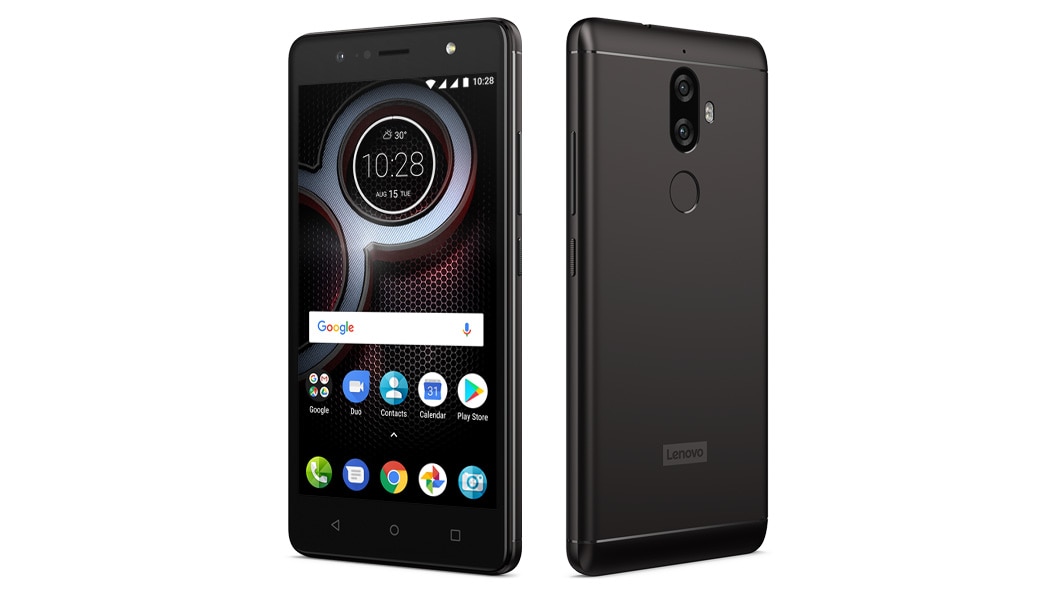
Lenovo K8 Plus

lenovo k8 plus review lead
The latest to join the dual-camera smartphone brigade, the Lenovo K8 Plus, is priced at Rs 10,999. There’s a combination of 13-megapixel and 5-megapixel sensors at the back for DSLR-like effect in your photos. Up front, there is an 8-megapixel camera. Given that it is a budget contender, other specifications of the phone are entry-level, such as 3GB of RAM, 32GB of onboard storage, and a smaller 5.2-inch display. However, there’s a 4,000mAh battery, which also serves as the second highlight after the dual cameras. 

Moto G5s

Moto-G5s
The Moto G5s, priced at Rs 13,999, boasts a 5.2-inch full HD display, and is equipped with Qualcomm’s Snapdragon 430 octa-core chipset paired with 3GB RAM and 32GB expandable internal storage. Although there is no dual-camera setup on this one, you can still get decent results with its 16-megapixel rear camera and 5-megapixel front camera.  The phone runs on stock Android Nougat out-of-the-box, and is fueled by a 3,000mAh battery. 

LG Q6

Sitting right in the given price segment, the LG Q6 offers a 5.5-inch full HD (1080p) FullVision display. Again, there is no dual-camera setup on the phone. There’s a single 13-megapixel camera sensor at the back, and a 5-megapixel camera up front. In addition to the edge-to-edge display, the smartphone runs on Android Nougat out-of-the-box, and is fueled by a 3,000mAh battery. 

Xiaomi Mi A1

Currently the leading model in the budget dual-camera phone segment, the Xiaomi Mi A1 brings the latest stock Android 7.1.1 Nougat experience at Rs 14,999. Being a part of Google’s Android One program, it is also set to get the Oreo update before the end of the year. It is equipped with a 12-megapixel wide-angle lens and a 12-megapixel telephoto lens with 2x optical zoom support at the back. There’s also 4GB of RAM along with 64GB of default storage. 

Nokia 6

nokia 6 review main
From the affordable segment, the Nokia 6 boasts aluminium unibody design, and packs a 5.5-inch full HD display. There’s a single 16-megapixel rear camera along with an 8-megapixel camera up front. It runs Qualcomm Snapdragon 430 SoC with 3GB of RAM and 32GB of internal storage, which is expandable up to 128GB. 
Read More

5 smartphones you can buy this Diwali under Rs 10,000

October 11, 2017 0

Looking for a smartphone under Rs 10,000 this Diwali? Here's a list of the best ones.

Diwali is fast approaching, and many of us are no doubt in the market for a new smartphone. If you are looking for a smartphone for yourself or for gifting, there is no better time than now. There are a lot of devices to choose from, and there are a bunch of offers to take advantage of as well. If you are in the market for a smartphone priced below Rs 10,000, here’s our pick of the five best smartphones.

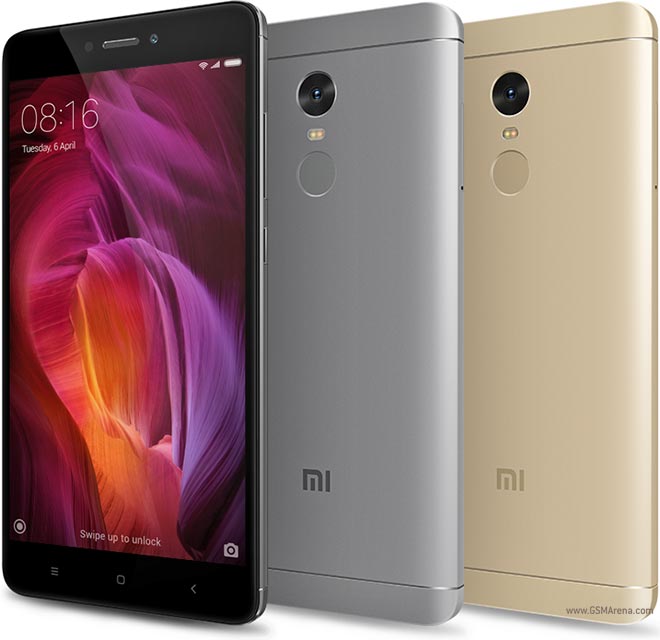
Xiaomi Redmi Note 4

Xiaomi Redmi Note 4 is the top-selling smartphone online in India. While the smartphone is available in three variants, the 32GB internal storage with 2GB RAM, which is priced at Rs 9,999 is the one we are looking at right now. The smartphone comes with an impressive build quality featuring a full metal body. It features a a 5.5-inch full HD (1080p) display, Qualcomm’s Snapdragon 625 octa-core processor, 13-megapixel camera at the back, 5-megapixel selfie camera, and a 4,100mAh battery. It also comes with a fingerprint sensor at the back.

Xiaomi Redmi 4

The Redmi 4 is among the Xiaomi’s three best-selling smartphones this year, with over 1 million units sold in just 30 days from launch. Just like the Redmi Note 4, the Redmi 4 also comes in three variants 16GB, 32GB and 64GB with 2GB, 3GB and 4GB of RAM. The base variant is priced at Rs 6,999, while the mid variant comes at Rs 8,999. All three variants offer 4G VoLTE support. The Redmi 4 is powered by an octa-core Snapdragon 435 SoC. On the camera front, it comes with a 13-megapixel primary camera with LED flash, and phase detection autofocus (PDAF). Up front, it has a 5-megapixel selfie snapper. It runs on Android Nougat 7.0 based MIUI 8 custom OS. 

Samsung Galaxy J3 Pro

samsung-galaxy-j3-pro-india-launch
Launched in April this year, the smartphone was launched as a direct competition to the Redmi 4A. The smartphone is priced at Rs 8,490.  The Samsung Galaxy J3 Pro flaunts a 5-inch HD (720p) Super AMOLED display, and it is powered by a 1.5GHz Spreadtrum quad-core SoC paired with 2GB of RAM. There is 16GB internal storage on offer, which can be expanded up to 128GB using a microSD card. There is an 8-megapixel rear auto-focus camera with f/2.2 aperture and LED flash. Up front, there is a 5-megapixel camera. Making sure everything ticks is a 2,600mAh battery. As with the Galaxy J series, there are value additions like the S Bike mode, which has been developed with the Indian audience in mind.

Nokia 3

nokia-3-stock-image
The Nokia 3 features a 5-inch HD display, MediaTek’s MT6737 quad-core SoC, 2GB of RAM and 16GB internal storage which is further expandable up to 32GB via microSD card. For optics, the smartphone comes with an 8-megapixel camera both in the front and rear. It houses a 2,650mAh battery, and runs on stock Android Nougat 7.0 out-of-the-box. HMD Global has also promised that the smartphone will be getting two major Android OS upgrades. 

Moto E4 Plus

The Moto E4 Plus has a 5.5-inch HD (720p) display with curved glass on top. It is powered by a 1.3GHz quad-core MediaTek MTK6737 SoC. The 32GB of internal storage is expandable up to 128GB via microSD card. It also has a fingerprint scanner integrated into the physical home button. The Moto E4 Plus is equipped with a 13-megapixel primary camera with f/2.0 aperture, auto-focus, and LED flash. On the front, it features a 5-megapixel selfie snapper. The Moto E4 Plus is priced at Rs 9,999.
Read More