guruTricks: YouTube

Technology

  • News
  • Tips
  • Tricks
  • Tutorials

Hot

Showing posts with label YouTube. Show all posts

Friday, November 24, 2017

YouTube cracks down on child-exploiting channels

November 24, 2017 0

YouTube will apply machine learning technology and automated tools to discover potentially exploitive content.

youtube-logo

Cracking down on abuse and child-exploiting channels and videos, YouTube announced it will remove content on the platform that attempts to pass as being “friendly for kids”.
“While some of these videos may be suitable for adults, others are completely unacceptable, so we are working to remove them from YouTube,” Johanna Wright, Vice President of Product Management, YouTube, wrote in a blog post.
The Google-owned company will apply machine learning technology and automated tools in order to discover potentially exploitive content. YouTube has terminated 50 channels and removed thousands of videos as also advertisements from 5,00,000 exploitive videos under the current set of guidelines.
The company will also continue to work with the National Center for Missing and Exploited Children (NCMEC) to report the potentially illegal behaviour to law enforcement, said Wright. Meanwhile, YouTube Kids announced new measures last week for parents if they find children watching inappropriate videos at home even by mistake.
If the user is signed in while reporting a video, it will also be blocked from the YouTube Kids app, the company said in a statement. “When you block a video or channel, you will no longer see that video on the YouTube Kids apps when you are signed in. You can always clear your blocked videos and channels from Settings if you change your mind,” the company had said.
Read More

Friday, November 17, 2017

YouTube rolls out ‘pinch to zoom’ feature for smartphones with 18:9 displays

November 17, 2017 0

YouTube uses 16:9 aspect ratio for its videos.

YouTube new logo
This year’s most popular smartphone trend is the edge-to-edge or full display design. Starting with the Samsung Galaxy S8 series back in March, almost all flagships have embraced the full display design quite religiously. In line with this trend, YouTube has released a new update to its app. This update gives smartphones with displays offering 18:9 aspect ratio the ‘pinch to zoom’ feature.
YouTube uses 16:9 aspect ratio for its videos on the platform. For those videos lower than this aspect ratio, YouTube processes and minimizes the video file which then appears with black bars on the left and right sides or on top and bottom. This way, it crops the videos giving the 16:9 aspect ratio. However, for smartphones with displays offering more than 16:9 aspect ratio, YouTube videos would be cropped accordingly.
The latest YouTube update is now available for both iOS and Android which you can download from App Store and Play Store, respectively. On Play Store, the update is version 12.43, and on App Store it’s 12.44. There are a good number of Android smartphones with large displays. For the iOS platform, it’s only the recently launched iPhone X. Google had first included this feature for its Pixel 2 XL smartphone which also has the same display. Samsung also has a similar feature for its 18:9 display smartphones, the Galaxy S8 series and Galaxy Note 8. 
In September, Google released HDR support for YouTube videos as an exclusive update for flagship smartphones. This feature would only work on smartphones supporting HDR video and some of these include the Google Pixel  series, Galaxy S8 duo, Galaxy Note 8, LG V30, among others. 
More recently, Google announced its latest stats on YouTube and its future plans as well. With over 1.5 billion users globally, an average YouTube user spends at least 60 minutes daily on mobile devices. Interestingly, YouTube also gets over 100 million hours of watch time on TV sets through devices like Roku, Chrome Cast and Amazon Fire TV. Google CEO Sundar Pichai further said that the company will focus on increasing its subscription-based monetized models for YouTube. 
Read More

Friday, October 27, 2017

YouTube now gets over 100 million hours of watch time in the living room everyday: Sundar Pichai

October 27, 2017 0

YouTube's viewership on TV sets via gaming consoles and streaming devices has seen a 70 percent increase.

YouTube new logo
In a world where content consumption is increasing on mobile devices, things are taking a different turn for YouTube. Google’s parent company Alphabet held its Q3 earnings call where it announced the latest figures. During the earnings call, Alphabet also mentioned how YouTube is a major revenue builder for Alphabet. It also mentioned how people watch 100 million YouTube videos per day on TV sets.
Google CEO Sundar Pichai talked about the growth and future perspectives of YouTube. He starts by saying how YouTube “continues to see phenomenal growth” with over 1.5 billion users globally. Pichai says that an average users spends at least 60 minutes a day on YouTube on mobile devices. He further says how YouTube watch time isn’t growing just on smartphones and desktops. Pichai adds, “YouTube now gets over 100 million hours of watch time in the living room everyday.”
What he means by this is YouTube viewing time garnered from TV sets, gaming consoles, and devices such as Roku, Chrome Cast and Amazon Fire TV. In fact, the viewership of YouTube through these platforms has seen a 70 percent increase as compared to last year. With the onset of people switching to smart TVs and streaming devices for a connected TV watching experience, this growth doesn’t seem surprising. It does pose a threat to traditional TV manufacturers and DTH services though. 
Pichai also announced future plans for YouTube with the company focusing on increasing its subscription-based monetized models. As for YouTube Red, Pichai said that it would release over 40 original shows through the service this year. YouTube Red is a highly sought-after service but is available in only five countries for now – US, Australia, Mexico, New Zealand, and South Korea. Stats for YouTube TV which broadcasts live from over 40 networks was also mentioned. YouTube TV now covers two-thirds of US households and is available in 50 metro areas.
Read More

Google engineer reveals how any iPhone app with camera permission can record you

October 27, 2017 0

Sadly this is how the privacy setting is expected to work by design.

apple-camera-app
Nothing else but the word scary can define this. Google engineer Felix Krause has revealed an alarming privacy loophole in iOS that enables iPhone apps that seek camera permission to surreptitiously take photos and videos of you – without your knowledge – reports The Next Web. Krause says he has disclosed this issue to Apple.
The Googler pointed out that when a user grants an app the permission to access the camera, they basically enable the app to access both front and rear camera and your photographs. Which means, whenever the app is playing the foreground, it can “record you, upload the content immediately, and run real-time face detection to read your facial expressions”. And all of this without any notice or indication that your iPhone is snapping images of your face. No sound, no light, no LEDs.
Krause has shared a short demonstration of the documented issue on YouTube, which can be seen below.
Now the most appalling bit of this scenario is that this is not even a bug that can be fixed, but is how this privacy setting is expected to work by design. This means that when you have granted app permission to someone who wished to exploit these permissions, they could easily scrape image data to locate users, find other existing photos of the device’s owner, and even watch you while you’re maybe sitting on the toilet and upload it up on the web. 
Krause says there is only so much you can actually do to prevent this, however there are ways, but he warns that none of them make for a particularly smooth and streamlined user experience.
One way is to use webcam covers. And the other is to revoke camera access for all apps – quite definitely that would mean sacrificing some app functionality in the meanwhile, like taking and sending photos straight from apps such as WhatsApp and Facebook. 
Read More

Saturday, October 7, 2017

WhatsApp and YouTube banned for ‘on-duty’ railway officials: Report

October 07, 2017 0

Both apps are being seen as a "major distraction" during work hours.

india-train-stock-image
After a spate of train accidents in the country that has led to over 300 deaths in 2017, railway officials have been barred from using WhatsApp while on duty. A circular has been issued by the Delhi division of Indian Railways to its entire staff that includes drivers, guards and TTEs, asking them not to use the messaging app during duty hours, India Today reported. WhatsApp has been termed as a “major distraction” by the authorities.
Anyone violating the orders would be dealt with strictly, the circular noted. Such orders would eventually be issued across all railway divisions, and not just in Delhi. “It was noted that several staff associated with the safety department or the operational staff were indulging in WhatsApp and YouTube during working hours. This caused major distraction and thus compromised passenger safety. They have been told not to use these apps and entertainment medium and perform their duty with greater efficiency and alertness,” a railway official reportedly said.
The ban would be applicable to all maintenance and safety staff in the railways. It includes track-men, gang men guards on crossings, loco pilots, and train guards. Even mid-level station managers and superintendents are prohibited from using the apps during work hours. However, it is not clear when the ban comes into effect. All communication among staff members would have to be done via walkie-talkies. Additionally, drivers and guards have been asked to switch off their mobile phones while on duty. 
WhatsApp and YouTube are surely the most popular apps in India. This country accounts for WhatsApp’s largest user base in the world, and over 96 percent of smartphones in India have WhatsApp, a 2016 study revealed. It has a higher penetration than Facebook’s Messenger application, and homegrown messaging app Hike. YouTube, too, has 180 million users in India, which is one of its top global markets. In August, the video-sharing platform stated that 85 percent of its India traffic was coming from smartphones. With the government pushing for Wi-Fi availability across major railway stations as part of its Digital India initiative, it is only natural that officials used apps freely.
{BGR}
Read More

Friday, September 29, 2017

Reliance JioPhone spotted with Facebook, YouTube, USB tethering

September 29, 2017 0

Reliance has just begun delivering the JioPhones to customers who had pre-ordered.

Reliance Jio with its JioPhone has created all the buzz for feature phones in India. The JioPhone is the first feature phone with 4G VoLTE support, and comes bundled with ‘smart’ features. In addition to the multiple features already available on the JioPhone, it was still rumored to support apps like Facebook, YouTube, and USB tethering as well. A JioPhone with these apps has now been spotted.
91mobiles has shared images and videos of an alleged second-generation JioPhone running Facebook and YouTube apps. This new unit of the JioPhone runs a new version of KaiOS. While the apps are installed on the device, the video doesn’t show either Facebook or YouTube running. Although this seems doubtful, it could have happened that some units of the JioPhone were shipped with an upgraded KaiOS, but not a full functioning one as yet. JioPhone deliveries began last Sunday across India. Also, Jio is expected to release a KaiOS update which will bring these apps on the device.
This unit of the JioPhone comes with USB tethering option which allows one to connect laptops to the internet. You can also uninstall apps on this JioPhone unit. WhatsApp and Wi-Fi hotspot both are also expected to be available on the JioPhone, but there isn’t any confirmation on this as yet. It isn’t known when Jio would be releasing the software update for the JioPhone. It hasn’t been even a week since the deliveries began. Jio says that it will deliver 6 million devices within 15 days, with urban areas first in line to receive it. 
Priced at a refundable amount of Rs 1,500, the JioPhone features a 2.4-inch display, a 2-megapixel rear camera, and a front-facing VGA camera. It comes with 512MB of RAM, and 4GB of internal storage. The internal storage can further be expanded up to 128GB via a microSD card. It is backed by a 2,000mAh battery. 
Connectivity options on the JioPhone include 4G VoLTE, Wi-Fi, Bluetooth, FM Radio, GPS, micro-USB port, and a 3.5mm audio jack. It also comes with support for NFC for digital payments. More features on the JioPhone include support for 22 regional languages, pre-loaded Jio apps, a built-in voice assistant, and an LED torch. In addition to special recharge packs for JioPhone users, Reliance Jio has made voice calls are free for a lifetime.


Source: BGR
Read More

Tuesday, September 12, 2017

How To Play YouTube Videos In Background (No-Root)

September 12, 2017 0


How To Play YouTube Videos In Background (No-Root)
Today we will be sharing useful trick that will help you to play Youtube videos in the background. The best part of this method is that you won’t need to root your Android device. Therefore go through the post to know how to play YouTube videos in background without rooting your Android Device.
Many of rooted Android, users make use of Xposed installer on their Android device that helps them to do lots of tweaks on their rooted Android. And one of the cool features is playing your favorite Youtube videos in a background. However, playing Youtube videos in the background is not possible without rooting, and we also know the fact that rooting voids device warranty and also risks your Android to lots of exploits. Therefore, here we have an excellent method by which you don’t need to root your device, and you will be able to play these videos in the background. So have a look at complete guide discussed below to proceed.

How to Play YouTube Videos in Background Without Rooting Android

The method is very straightforward and easy and just requires a cool Android app that will allow you to play your favorite Youtube videos in the Android background. So follow the steps below to proceed with the complete guide below.

Steps To Play YouTube Videos in Background In Android:

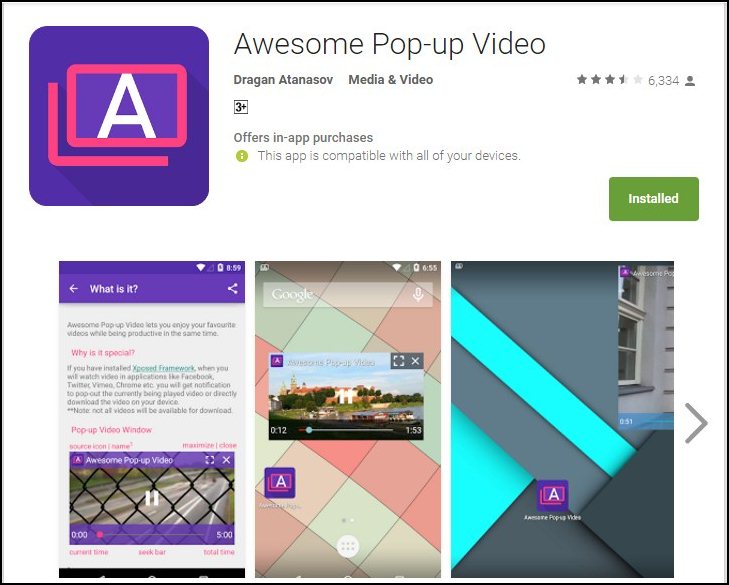
Step 1. First of all, you need to download and install the app Awesome Pop-up Video from Google play store.


 Play YouTube Videos in Background In Android
Play YouTube Videos in Background In Android

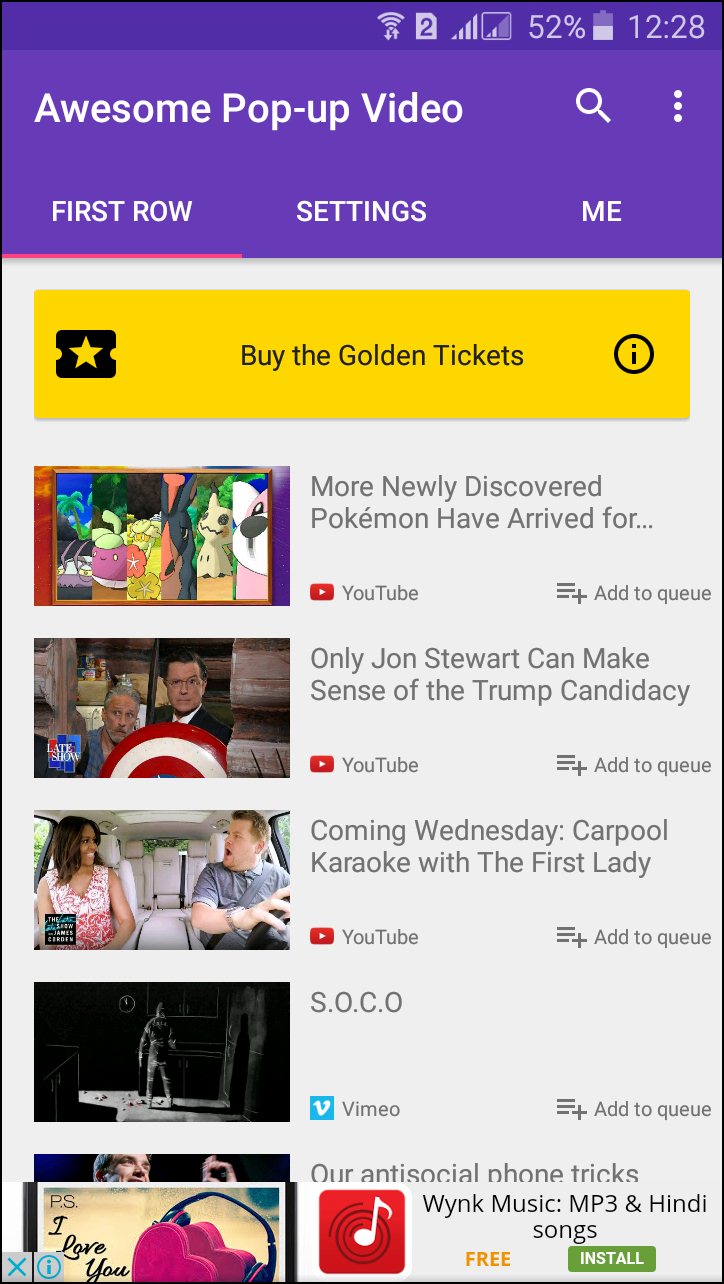
Step 2. Once installed, you need to open the app, and it will load their recommended videos for you.


 Play YouTube Videos in Background In Android
Play YouTube Videos in Background In Android

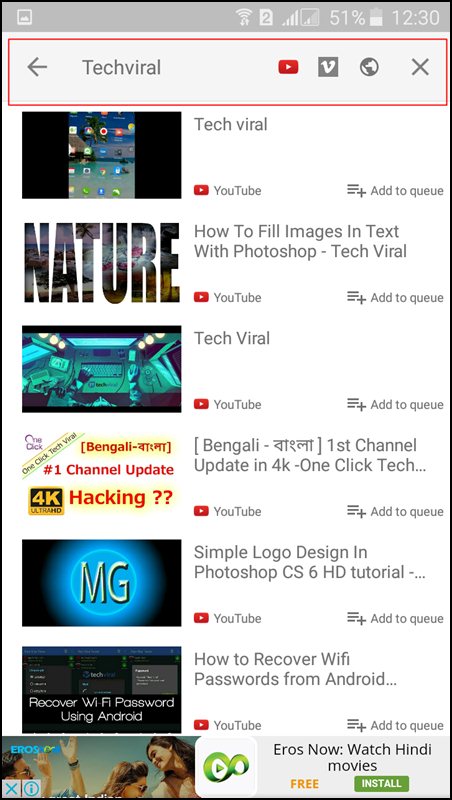
Step 3. You need to hit the search button and search for your preferred videos there.


 Play YouTube Videos in Background In Android
Play YouTube Videos in Background In Android

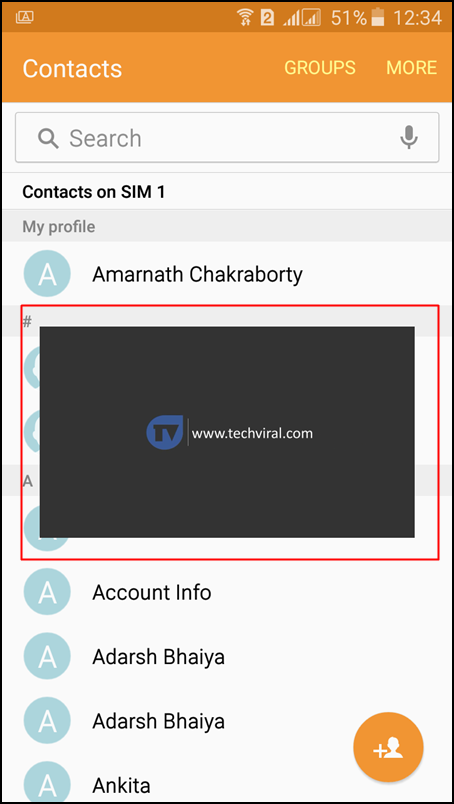
Step 4. Just tap on the video that you want to play in the background. It will load the video for you to play in the background. Once loaded, you will see a pop-up appears loading the Youtube video.


 Play YouTube Videos in Background In Android
Play YouTube Videos in Background In Android

That’s it you can now do whatever you want, your videos will always run in the background, you can do any task without closing the playing video.

Using Flytube

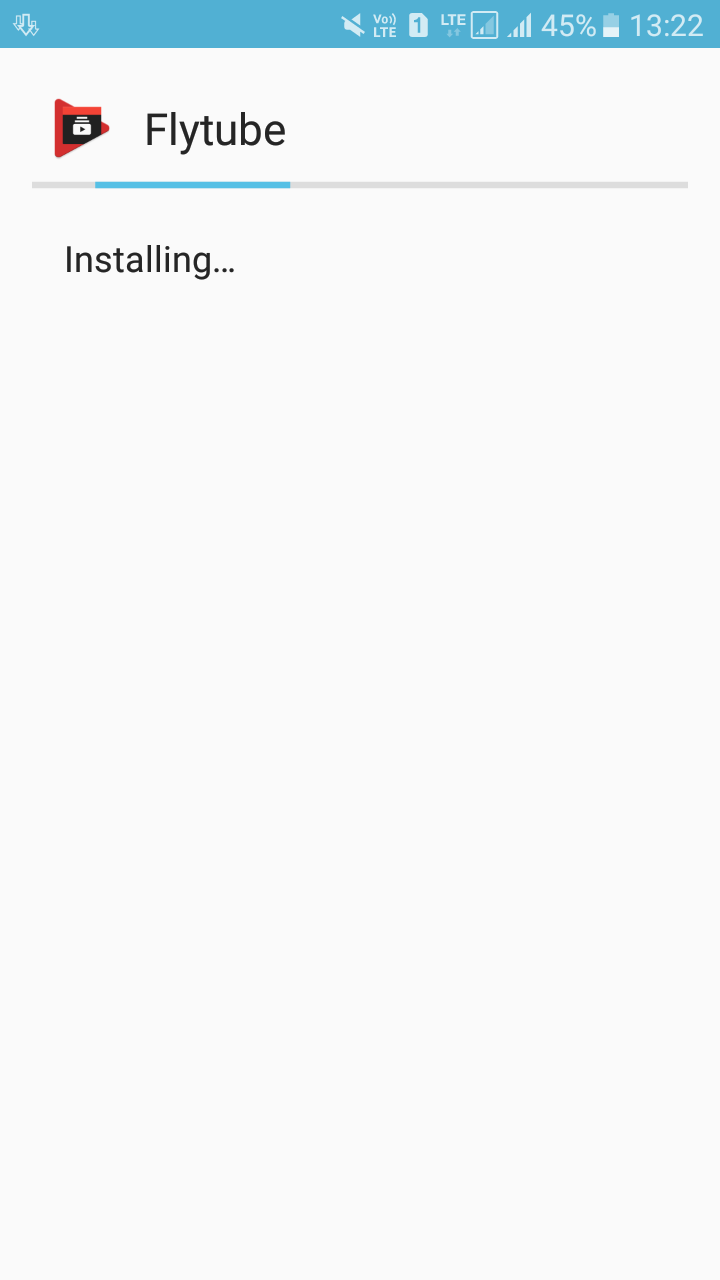
This is another app just like Pop-up videos, but this app has been removed from Google Play store. However, you can grab it from here. Download it on your Android smartphone and follow the steps below to watch Youtube video in background
Step 1. First of all, download and install Flytube on your Android smartphone


Using Flytube
Using Flytube

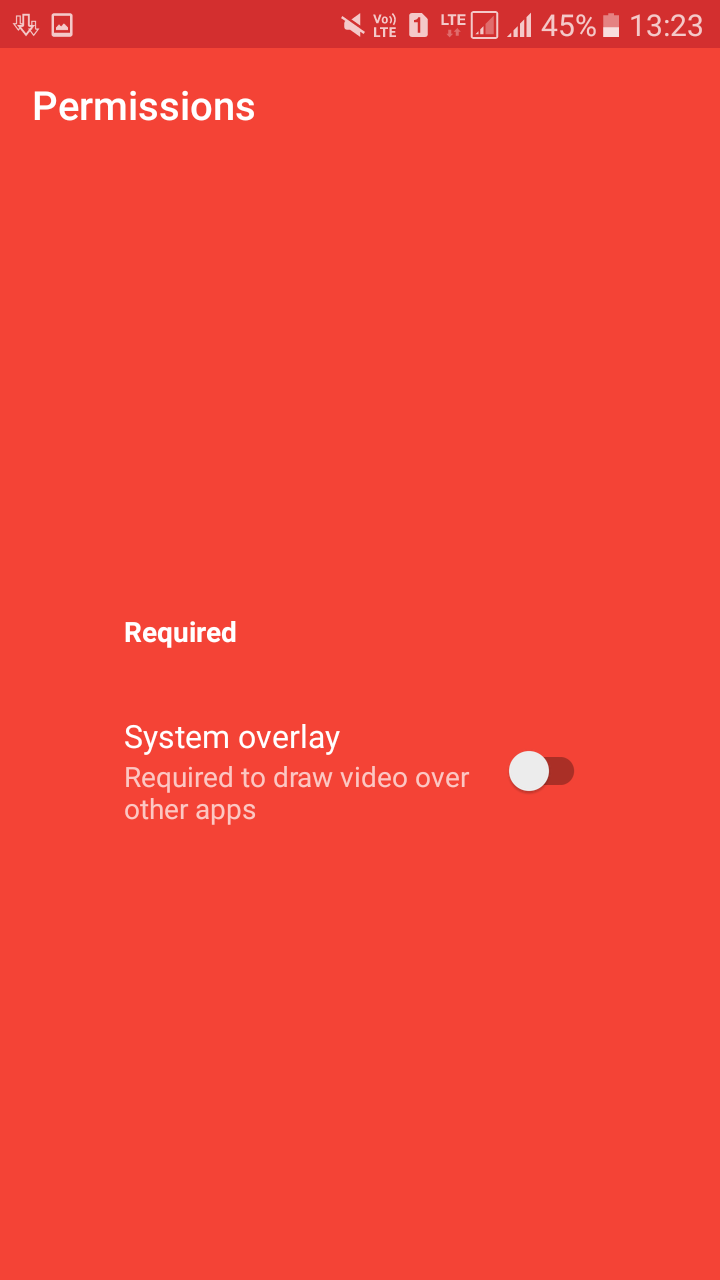
Step 2. Now open the app, and you need to grant some permissions that it will ask. Must remember to remove all the Youtube links. Simply disable the YouTube app before using Flytube.


Using Flytube
Using Flytube

Step 3. Now you will see a similar screen like below. You can search for your YouTube video just like you do in YouTube app.


Using Flytube
Using Flytube

Step 4. Now click on the video, and it will ask you to choose the app to open the video. Just select Flytube.


Using Flytube
Using Flytube

Step 5. Now do whatever you want on your Android device your video will be playing in a small pop-up video bar.


Using Flytube
Using Flytube

So above is all about How to Play YouTube Videos in Background Without Rooting Android.

Read More

How to Fix Youtube Videos not Playing on Android, iPhone, PC or MAC

September 12, 2017 0


Fix Youtube Videos not Playing
If you are facing any problem regarding youtube videos that are not getting play in our devices then in this article we are going to discuss the ways to Fix Youtube Videos not Playing on Android, iPhone, PC or Mac.
Youtube is just awesome and is a part of the life as it feels to me! Without youtube, it just feels like time cannot be realized or enjoyed up really. Youtube is a well-developed media content player online or video hanger and as it is made with so many efforts and pushes there cannot be any issues found regarding its working. But if you are playing up the youtube then in some rare cases there have been an issue noticed that the Youtube videos don’t play up on the either devices like Android, iPhone, PC or Mac. This is one issue that if you get on your youtube then you cannot fix it easily as you might be struggling to find up any such option through which it could run alive again. Get easy about the matter as you can now easily fix up the issue by just an easy method, just read up the below article to know about that method.


How to Fix Youtube Videos not Playing on Android, iPhone, PC or MAC

Below are the ways that will help you to fix Youtube Videos not Playing on Android, iPhone, PC or Mac. So follow the below guide to proceed.

# Android

For android users, they can do up some of the following things to prevent or fix up the youtube errors –
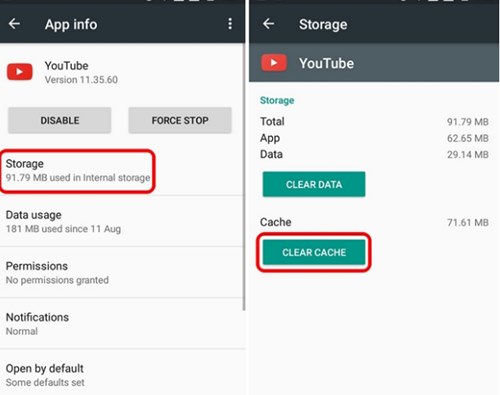
1. Clear Youtube App Cache: If the problem is occurring in the Android App then the very first thing that you can prefer to do is clear up the youtube app cache. Simple! but can be very much effective, just try it to know it.


fix-youtube-videos-not-playing-on-android-iphone-pc-or-mac
fix-youtube-videos-not-playing-on-android-iphone-PC-or-mac

2. Update App: The problem can also be there if you have not yet updated to the latest version of the Android Youtube App, so to try fixing it update the whole Android youtube app.

# iPhone (iOS)

Now if you are not an android device user and using up the youtube on your iOS device official youtube app then you should follow these below simple things to fix up the related issue-
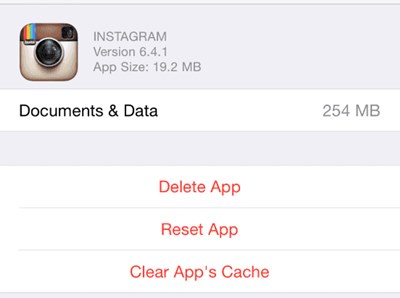
1. Clear Youtube App Cache: If the problem is occurring in the iOS Youtube App then the very first thing that you can prefer to do is clear up the youtube app cache. Again Simple enough! but can be very much effective, just try it to know it.


fix-youtube-videos-not-playing-on-android-iphone-pc-or-mac
fix-youtube-videos-not-playing-on-android-iphone-PC-or-mac

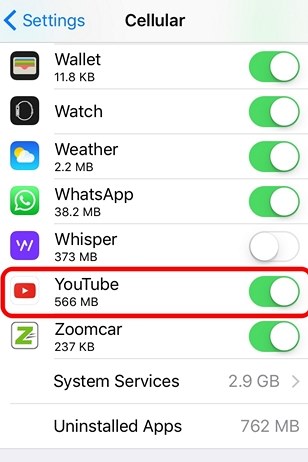
2. Enable Mobile Data Usage for Youtube: Recheck whether you have enabled the flow of internet data on your Youtube app on iOS, just go to the mobile/cellular settings and then from the list scroll down and find up the youtube app. Now turn up the toggle if it is disabled unless keeping it unchanged.


fix-youtube-videos-not-playing-on-android-iphone-pc-or-mac
fix-youtube-videos-not-playing-on-android-iphone-PC-or-mac

3. Update Youtube App: The problem can also be there if you have not yet updated to the latest version of the iOS Youtube App, so to try fixing it update the whole youtube app.

# PC or MAC

Now apart from the other two above devices that have their official apps for the youtube, the youtube can only be accessed through the web browsers on the PC and Mac. There are some of the changes that could be made for the popular web browser chrome that could fix up the Youtube playback problems.
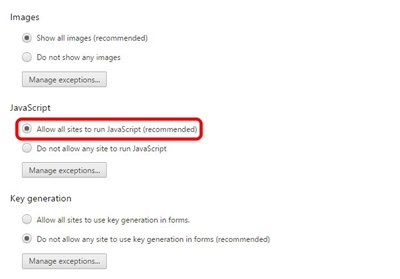
1. Chrome: Inside the chrome settings point towards the “Show Advanced settings” and click on it. In the privacy section go to the ‘content settings‘ option and under that panel select “Allow all sites to run javascript” and then click the “Done” button.
Disable up the hardware acceleration under the “Show Advanced settings” >”System” by unchecking the “Use Hardware acceleration when available“.


fix-youtube-videos-not-playing-on-android-iphone-pc-or-mac
fix-youtube-videos-not-playing-on-android-iphone-PC-or-mac

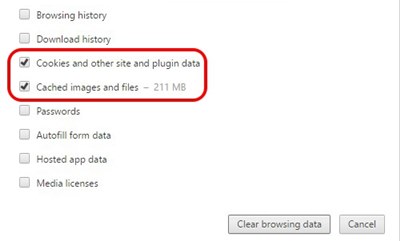
2.Clear Cache: This is what you people might be familiar with while surfing on your web browsers, so just do up the same thing now only maybe you haven’t done it for too long so only this might be causing the youtube issues.


fix-youtube-videos-not-playing-on-android-iphone-pc-or-mac
fix-youtube-videos-not-playing-on-android-iphone-PC-or-mac

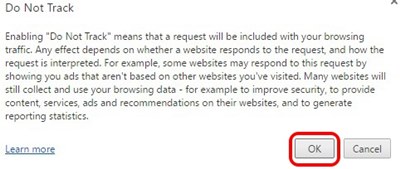
3. Stop Tracking : Now we are discussing for the chrome browser only but you should find out the way for your web browser, just go to the “Settings>show advanced settings” and under the privacy, section enables up “Send ‘Do Not Track‘ request with your browsing traffic”.


fix-youtube-videos-not-playing-on-android-iphone-pc-or-mac


Read More

YouTube Adds Support For HDR Video, Here Is The List Of Devices

September 12, 2017 0

YouTube Adds Support For HDR Video, Here Is The List Of Devices
The Samsung Galaxy Note 7 was the first smartphone of the South Korean giant to offer support for video playback in HDR, which was provided by the popular video streaming service Netflix. However, now the giant video platform YouTube doesn’t seem to have any plans of leaving their users behind in the technology race.

YouTube Adds Support For HDR Video, Here Is The List Of Devices

The Samsung Galaxy Note 7 was the first smartphone of the South Korean giant to offer support for video playback in HDR, and Netflix and YouTube platforms are the first to offer this improvement.
Although Netflix still does not support the devices of the South Korean giant Samsung, now we can already see YouTube in HDR from these last two smartphones: Samsung Galaxy S8 and Samsung Galaxy S8+.
With the launch of the Samsung Galaxy S8 and Samsung Galaxy S8+, the South Korean giant Samsung has managed to position itself at the top: they had the best screen in the market when they launched – in color reproduction – with 112% of DCI-P3.
The South Korean giant Samsung has returned to do the same with the latest Galaxy Note 8 and continues to carry the banner of the screens in the smart phone sector. And the ability to play HDR video is one of the determining factors in this regard. Well, now it is possible to express this quality of screen thanks to YouTube, which already serves HDR video for both devices.

YouTube goes ahead: you can already take advantage of the HDR videos on your Samsung Galaxy S8, Galaxy S8 + and Note 8
At the moment the YouTube application only offers users of these two smartphones Full HD resolution 1920 x 1080 pixels as the maximum to enjoy the high dynamic range, HDR, but the platform is ready to serve HDR videos in 4K resolution.
Now, it is not known if, when it arrives, the QHD resolution with HDR will be used in smartphones, or it will be delivered directly at the maximum resolution. At the moment, as we said, the most we can enjoy is Full HD with HDR inside YouTube.
The only thing we have to fulfill a requirement, besides having one of these smartphones, is to have the YouTube application updated to the latest version available on the Google Play Store. It is also appearing on the Samsung Galaxy Note 8, and will soon be adding new devices to the list. And now that YouTube has taken the plunge, surely Netflix will not take too long to do the same with its streaming video service.
Moreover, here is the list of the first lot of devices that will receive the HDR update:-


  • Pixel
  • Galaxy Note 8
  • Galaxy S8
  • Galaxy S8+
  • LG V30
  • Xperia XZ Premium
Read More

Wednesday, August 30, 2017

YouTube gets a new design and logo, more features added

August 30, 2017 0
YouTube

YouTube gets the biggest aesthetic makeover for the first time in the past 12 years. The biggest change after the revamp is seen in YouTube's logo. The earlier logo focused on the word "tube" if you remember. After the redesign, YouTube has now included a video play button before the word "YouTube" (you can see the image above). Both the desktop and mobile version of YouTube has been re-designed. Apart from the changes in the logo, with the major revamp, YouTube brings a range of features on board.
"It's an evolution, not a revolution," says Christopher Bettig, the head of YouTube's art department. With the revamp, the video platform announces basket of new features like typeface, color scheme and few more. The YouTube mobile app for both iOS and Android users has been redesigned. YouTube is eventually rolling out the features to both the platforms.
The newly designed YouTube comes with a lot of new features. YouTube app now includes a white background along with the new logo. This is placed on the left top of the platform. The navigation tabs also see major changes. With the revamp, YouTube navigation tab has been moved at the bottom of the page. YouTube also comes with a new Library and Accounts tab.
YouTube has also introduced a new gesture which will allow users in fast forwarding or rewinding a video. With the new feature, users will be able to forward or rewind a YouTube just by double tapping the left and right side of the video screen. This new swiping gesture is yet to be rolled out, and YouTube says that they will do so in the next couple of months.
Read More

Saturday, August 19, 2017

YouTube adds ‘breaking news’ section to desktop, mobile app

August 19, 2017 0
youtube-breaking-news-section

Google has added a “Breaking News” section to YouTube’s mobile apps and desktop homepage. The feature was first spotted by Android Police.
The news section looks similar to the recommended channel on the web homepage, and as a scrollable carousel in the mobile app. Today, the Breaking News section is filled with videos about the recent Barcelona terror attack. The report also suggests that the feature is live for both iOS and Android devices as well as the desktop site. However, in India, at the time of filing this story, the feature was not seen on either the apps or the desktop site.
YouTube has also been testing the in-app chat feature for a long time now. Apart from that, YouTube has also recently rolled out a new feature for its live segment. Users can now see how many people are watching the live video. The live viewing count is real-time, and keeps fluctuating along with viewers joining or leaving. It is very similar to something that we see on Facebook and Instagram. Although YouTube hasn’t officially announced this feature, it is visible on the desktop, Android, and iOS apps. 
While on one hand, YouTube is adding new features to its platform, it is also ending support to some of its tools. Recently, it announced that starting September 20, the Video Editor and Photo slideshows tools will stop working. YouTube says that the two tools were the least used features, and so are being discontinued.
Source:BGR
Read More

Wednesday, August 16, 2017

How to Create YouTube Account Without Gmail

August 16, 2017 0
YouTube is one of the most popular platforms out there and unarguably the most popular video platform, but you already know all this. And you also know that there are many other useful features like subscriptions and watch history that can be used when you have signed in to YouTube. But to do that, you need a Gmail account, right? Well, not really. You can create a YouTube account without ever needing a Gmail account. This can come in handy especially when you are worried about privacy concerns while using Google products. You can also create multiple YouTube accounts without creating a corresponding number of Gmail accounts. So without further ado, here is how to create a YouTube account without Gmail:

Create YouTube Account Without Gmail

This method allows you to use YouTube and all its features without needing to use any other Google product. You can use any other email address – work or personal – for this method. Here are the steps for that:
  • Firstly, make sure that you aren’t logged in to a Google account anywhere else on the same browser. Then go to YouTube and click on “Sign in” on the top-right of its homepage.
YouTube Sign In
  • This will take you to the Sign In page. Here, click on “More options”.
More Options
  • You will now see two options. Click on the one that says “Create account”.
Create Account
  • You’ll now land on the “Create your Google Account” page. The form that you see on this page will be different from the one that you see when you create a new Gmail account. The difference – under “your email address”, you will see a link that says “I would like a new Gmail address”. Clicking on this will take you to the usual page and the text will change to “I prefer to use my current email address”. Fill this form with the email address that you want to use for YouTube and then click on “Next step”.
Fill Form
  • On the “Privacy and Terms” pop-up, click on “I Agree”. You’ll have to scroll to the bottom of that pop-up to be able to see that button.
Privacy and Terms
  • You’ll now have received a verification email from Google on the email address that you used to sign up. Open that email and click on the link given.
Email Verification
  • Clicking on that email will open a new tab that has a button called “Continue to YouTube”. Click on it.
Continue to YouTube
  • Now you will be taken to YouTube signed in with your email address that is not a Gmail one.
Singed Into YouTube
You can use this method to create as many YouTube accounts as you want – without ever needing a single Gmail account.

Source: Beebom
Read More